Browser in the Browser (BitB): when the login window is part of the attack
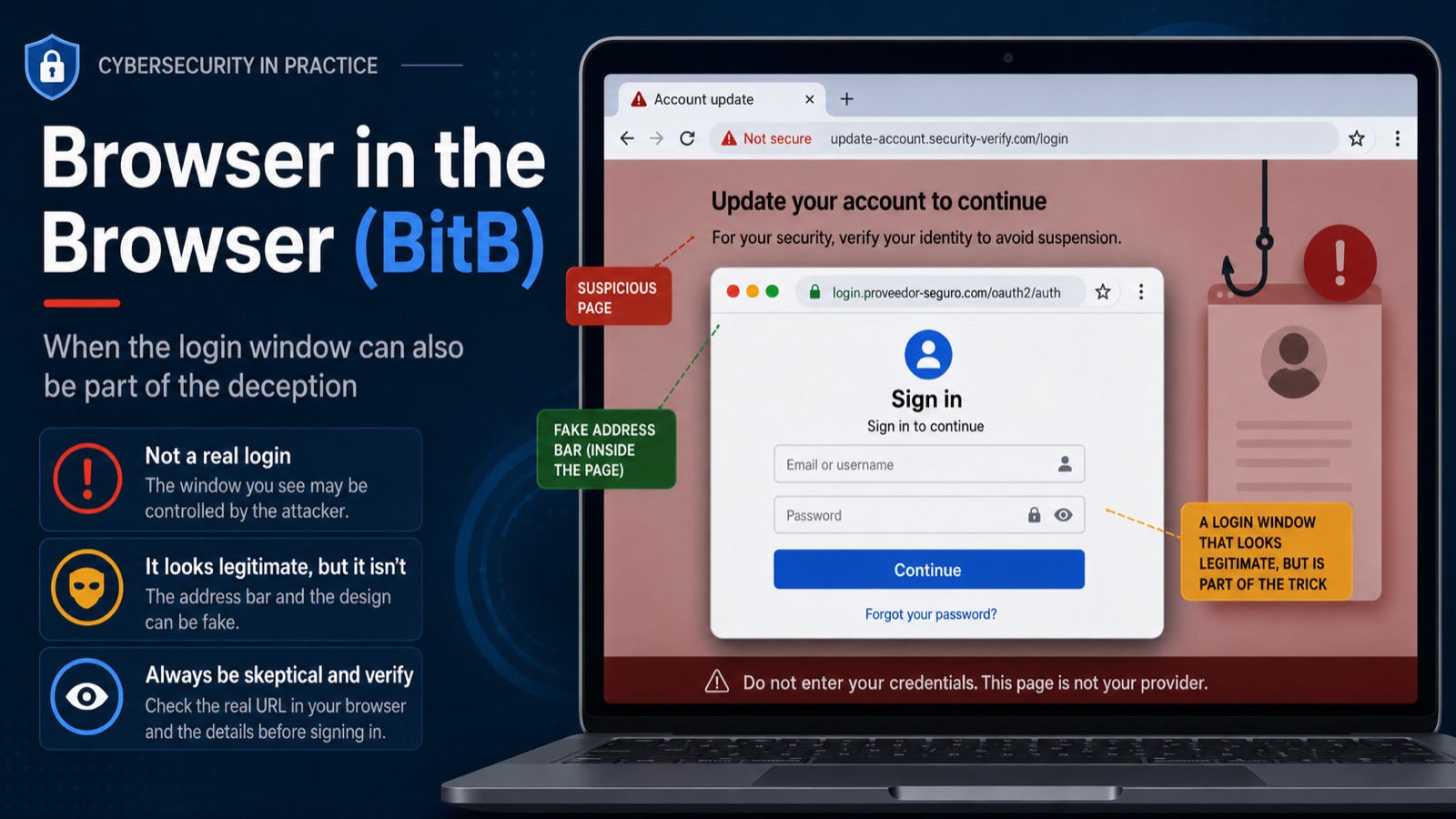
We have been taught for years to check the URL before entering our credentials. Browser in the Browser attacks exploit a subtle problem with that advice: what if the address bar you are checking is fake too?
Most phishing pages try to imitate a legitimate website.
They copy the logo, colors, typography, forms, buttons, and general layout of services we already know. But there has traditionally been one part that is particularly difficult for attackers to fake: the browser itself.
You may be able to clone a login page, but the real browser address bar still tells the user where they actually are.
Browser in the Browser, usually abbreviated as BitB, changes that.
Instead of only cloning a website, the attacker creates something that looks like an entirely separate browser window inside the current webpage, including its own title bar, controls, padlock icon, and — most importantly — a convincing address bar displaying a legitimate-looking domain.
The catch is simple:
None of that UI belongs to the browser. It is part of the webpage.
Where did Browser in the Browser come from?
The technique became widely known in March 2022 after security researcher mr.d0x published a demonstration showing how common browser authentication popups could be recreated using normal web technologies.
The idea was particularly effective because users are already familiar with this interaction.
Think about how often you see buttons like:
- Continue with Google
- Sign in with Microsoft
- Sign in with Apple
- Connect your account
- Authorize this application
Clicking one of those buttons often opens a smaller authentication window.
We have been trained to trust that pattern.
BitB attacks exploit that expectation.
The attacker does not necessarily need to compromise the real authentication provider or exploit a vulnerability in Chrome, Firefox, Safari, or Edge.
Instead, the attacker simply makes the webpage look like the browser opened a legitimate authentication popup.
That distinction is important.
BitB is not a browser vulnerability
Despite the name, Browser in the Browser is not normally an exploit against the browser itself.
There is no requirement for remote code execution, a sandbox escape, a zero-day vulnerability, or malware installed on the victim’s machine.
It is primarily a phishing and social-engineering technique.
The browser is doing exactly what it is supposed to do: rendering HTML, CSS, images, frames, and JavaScript.
The attack works because some of those elements are designed to imitate the browser’s own interface.
In other words, the vulnerability being exploited is largely our visual trust in browser UI.
How does a BitB attack work?
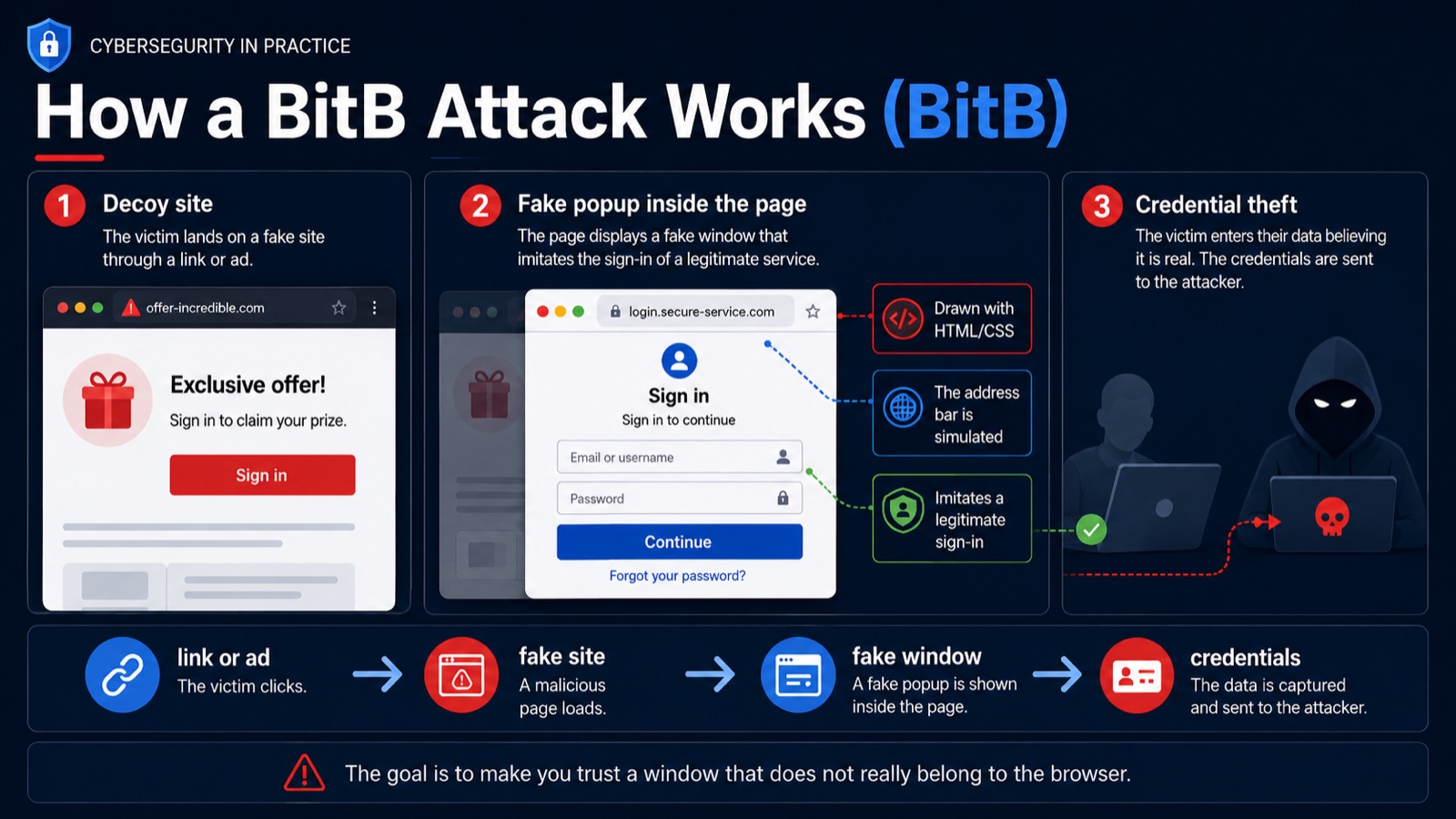
A typical attack can be reduced to a few stages.
1. The victim reaches a decoy website
The attacker first needs the victim to visit a website they control.
That can happen through a phishing email, a direct message, a search advertisement, a fake download page, a social media post, or virtually any other mechanism that can deliver a link.
The initial website does not necessarily have to look obviously malicious.
It might imitate a legitimate application, document-sharing service, company portal, giveaway, event registration page, or SaaS product.
2. The website asks the victim to authenticate
At some point the page displays something familiar:
Sign in with your existing account.
For example, the page might claim that authentication through a third-party identity provider is required before accessing a document.
The user clicks the button.
Normally, a real authentication popup would now be created by the browser.
But in a BitB scenario, no real authentication window needs to appear.
3. The website draws a fake browser window
The page creates an interface that visually resembles a separate browser popup.
It can include:
- window borders;
- close, minimize, and maximize buttons;
- a browser-style toolbar;
- a padlock icon;
- an address bar;
- the expected authentication provider domain;
- a realistic login form.
Modern HTML and CSS make reproducing these elements surprisingly easy.
JavaScript can add additional realism by allowing the window to move around the page, appear with animations, react to buttons, or behave similarly to a real popup.
Most importantly, the attacker controls the address bar shown inside that window.
It could display something reassuring such as:
https://login.example.com
while the actual browser tab is still running on:
https://attacker-controlled-site.example
The first address exists only visually.
It is text and graphics rendered by the webpage.
4. The victim enters their credentials
If the fake authentication window is convincing enough, the victim enters their username and password.
Those credentials are being entered into a form controlled by the attacker rather than the legitimate identity provider.
From the victim’s perspective, almost everything may look normal.
From the attacker’s perspective, the phishing page has done its job.
5. The attacker uses the captured information
The credentials can then be used against the legitimate service.
Depending on the attack and the authentication method involved, the phishing flow may also attempt to obtain additional information such as a one-time authentication code.
This is why it is worth making an important distinction:
BitB itself does not magically bypass multi-factor authentication.
It is the visual deception mechanism.
Other phishing techniques can be combined with it to request passwords, OTP codes, or other information.
Why is this technique so convincing?
What makes BitB interesting is not its technical complexity.
It is the way it takes advantage of a security habit that is normally very good advice:
Check the domain before entering your password.
The problem is that the victim may believe they are checking the domain.
They see a padlock.
They see the correct company name.
They see what appears to be the correct authentication URL.
Everything looks right.
But they are inspecting an imitation of the browser rather than the browser itself.
This becomes particularly dangerous with OAuth and SSO-style authentication flows because users already expect authentication to happen in a popup.
A second window appearing after clicking Sign in with… does not automatically feel suspicious.
It feels normal.
The attack is still relevant
BitB is not only an interesting proof of concept from 2022.
The technique continues to appear in real phishing operations.
In late 2025, security researchers analyzing Sneaky2FA, a commercial Phishing-as-a-Service operation, observed BitB functionality being incorporated into phishing pages.
That matters because Phishing-as-a-Service dramatically lowers the barrier to entry.
Attackers no longer need to design every component of a phishing campaign themselves. Kits can provide infrastructure, templates, evasion mechanisms, credential collection, and increasingly sophisticated interfaces.
Techniques that once appeared mainly in security research can therefore become packaged features available to much less sophisticated attackers.
Can multi-factor authentication stop BitB?
It depends on the type of authentication.
Traditional MFA methods such as SMS codes or TOTP authenticator codes are still pieces of information that a user can potentially type into a phishing page.
An attacker can therefore design a fake authentication flow that asks for them.
That does not mean BitB automatically defeats MFA, but it means that conventional MFA does not completely eliminate phishing.
A much stronger defense is phishing-resistant authentication, particularly technologies based on WebAuthn/FIDO2 and passkeys.
These authentication mechanisms are bound to the legitimate website’s origin.
A passkey created for a legitimate service cannot simply be used by an unrelated phishing domain pretending to be that service.
The visual appearance of the fake page becomes much less relevant because the cryptographic authentication mechanism cares about the actual domain, not the domain drawn on the screen.
This is one of the reasons companies such as Microsoft increasingly recommend phishing-resistant authentication for sensitive accounts.
How can you detect a Browser in the Browser attack?
There is no single visual trick that will expose every BitB implementation, especially as the quality of phishing pages improves.
But there are several useful signals.
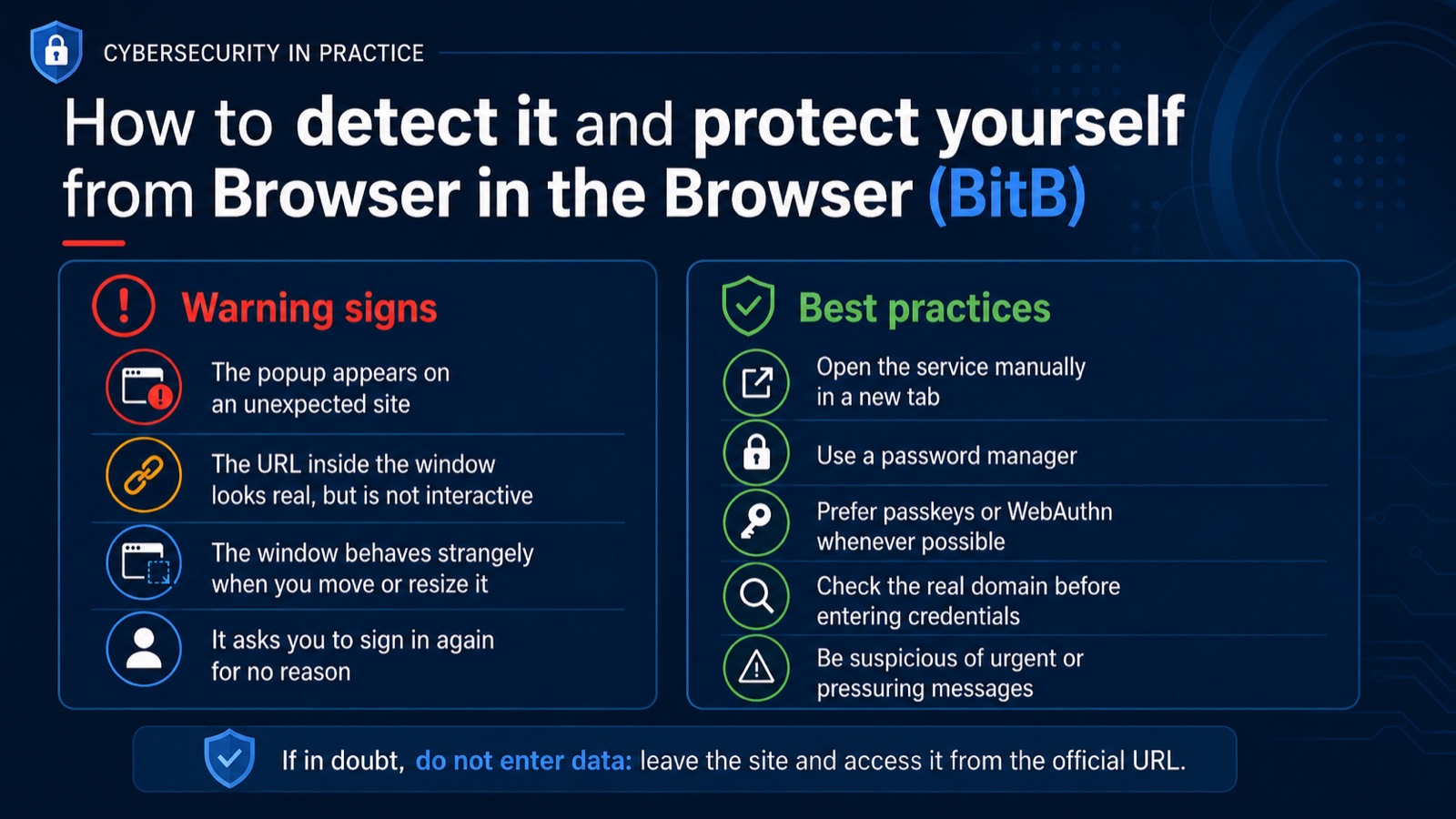
Try interacting with the supposed browser UI
Remember that the address bar inside a BitB window is not really an address bar.
Depending on the implementation, you may not be able to:
- select its URL;
- place the cursor inside it;
- open its browser menu;
- interact normally with the window controls.
Attackers can simulate some of these interactions, but doing so requires additional work.
Move the popup beyond the webpage
A fake popup normally exists inside the boundaries of the webpage that created it.
If you drag it around, it may behave strangely near the edge of the browser’s content area.
A real operating-system browser window can exist independently of the original page.
A simulated DOM element cannot genuinely leave its browser viewport.
This is not a perfect test — attackers can simulate movement very convincingly — but unexpected behavior can be a warning sign.
Pay attention to your password manager
Password managers know the real origin of the website.
If you normally receive an autofill suggestion for a service and suddenly your password manager does not recognize a supposedly identical login page, that deserves attention.
Do not treat this as proof by itself, but consider it a strong reason to verify what you are seeing.
Ask yourself why you are authenticating
Context remains one of the most powerful defenses against phishing.
Did you actually initiate this login?
Why does this website need your account?
Were you expecting an authentication request?
Did you arrive through an email, advertisement, QR code, direct message, or unexpected link?
A perfectly designed login page can still have a completely implausible reason for existing.
Open the service yourself
If something feels suspicious, do not continue investigating the popup.
Close the page.
Open a new browser tab and navigate manually to the service you intended to use, preferably using a bookmark or a domain you already know.
This removes the attacker-controlled webpage from the equation.
A subtle lesson about browser security
BitB highlights something broader than one phishing technique.
We often treat visual elements as security boundaries.
The padlock means secure.
The familiar logo means legitimate.
The login popup means authentication.
The address bar means identity.
But on the modern web, attackers can reproduce almost any visual element that exists inside a webpage.
Pixels are cheap.
Trust should therefore come from things the attacker cannot easily reproduce.
The real browser origin.
A password manager recognizing the correct domain.
A passkey bound cryptographically to the legitimate service.
A login request that you intentionally initiated.
A URL you opened independently rather than one delivered to you.
These signals are considerably stronger than a logo, a padlock icon, or a convincing window frame.
The simplest defense
There is a very practical rule that protects against BitB and many other phishing techniques:
When a website unexpectedly asks you to authenticate with an important account, do not use the login window it gives you.
Instead:
- open a new tab;
- navigate independently to the legitimate service;
- confirm whether there is actually something requiring your attention.
For high-value accounts, use passkeys or another phishing-resistant authentication method whenever it is available.
Because ultimately, Browser in the Browser attacks succeed by convincing us to trust something that merely looks like security UI.
And that is the most interesting part of the technique.
The attacker does not need to compromise the browser.
They only need to convince us that a piece of the webpage is the browser.
Further reading
- mr.d0x — “Browser In The Browser (BITB) Attack” — the March 2022 research that popularized the technique.
- Sophos — “Browser-in-the-browser attacks: watch out for windows that aren’t!” — an accessible technical explanation of why the deception works.
- Push Security — “Analyzing the latest Sneaky2FA Browser-in-the-Browser phishing page” — analysis of BitB functionality observed in a modern Phishing-as-a-Service kit.
- Microsoft — Digital Defense Report 2024 (PDF) — background on phishing-resistant authentication, FIDO2, WebAuthn, and passkeys.